06 January 2020

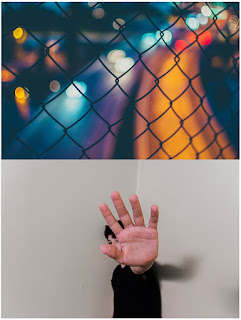
FINAL: SELF-PORTRAIT - Daydream/Nightmare

This project is about visual metaphor.

Visual metaphor is the representation of an idea through place/person/object/time/composition/color/etc.

RATIONALE:
To make images that are visual representations of what the two words - daydream & nightmare - mean to you, and to practice creative problem solving by thinking metaphorically and representationally.

DIRECTIONS: 
1.  Think of nightmare. What does that mean to you? What is the first picture that comes to mind? THAT could be your starting point.

2. What is the image you conjure when thinking of daydream? THAT could be your starting point.


3. With what you have access to in your personal life, how can you photograph THOSE ideas in way that will produce a well lit, purposefully composed images with visual metaphor?


***What place(s), objects, expressions, body language, light, etc. could you incorporate for each photo?***

THE PROCESS.
A. Make 3+ photographs that represent your definition of what a "daydream" looks like.
B. Make 3+ photographs that represent your definition of what a "nightmare" looks like.
C. Think outside the box to a sunny/pleasant place...and inside to a dark corner of the box.
D. You will be putting together a diptych next class. It will serve you to have THREE+ photographs of each idea to mix-and-match for the best possible combination to convey your narrative.
E. Test your creativity in new and challenging ways.

NOTE: You must be in one of the photos of the final diptych. No, do not make one of those ubiquitous selfies where you're trying to look good, but rather put yourself in the photo in some other way. 

INSPIRATION:
Arthur Tress. CLICK HERE.
People lost in daydreams. CLICK HERE.


16 December 2019

PROJECT #10: CLONES (Photoshop Layers Awareness)

TODAY IN CLASS: (12 points)
1. Make ONE practice image with 3+ different clones of your partner. 
2. Assemble the different images into one final image.
3. Post to your BLOG.
4. Drop to shared DRIVE.

@HOME FOR NEXT CLASS: (12 points)
1. Make two different sets of photographs (family/friend/yourself).
2. Assemble TWO images with THREE+ different clones each. 
3. Each final image must be a distinctly different setting/place. 
4. Bring photos to next class to begin processing and combining. 

NOTE: Direct your subject to do something different/odd/thought provoking for each of the separate photographs you make...make it something that is interesting and unexpected for the viewer. 

EXTRA CREDIT: If your clones give us a narrative of some sort, you will earn FOUR extra credit points. 

PAST STUDENT WORK:


DIRECTIONS: 
1. Placing your camera in ONE spot.
2. Do not move the camera. The background of each individual photo needs to match precisely.
3. Take multiple photographs with yourself in a different spot each time. 
4. Set the timer, or have someone carefully push the shutter button for each of the photos, if you wish. It  will look similar to this symbol in/on your camera:


Once the photos are taken...

4. Stack the images in Photoshop.
5. Erase the parts that are not needed from each layer so that the final compressed image contains you and your clones.

NOTE: Do not move the camera between photos. Even minimal changes in the camera position will distort perspective and light. 


EXAMPLES
Click on images for larger view.


Here are over-the-top examples by Martin Liebscher. CLICK HERE for his site. 


Here's a guy that does cloned video. Not what we'll do, but great anyway. CLICK HERE for more.