30 May 2023

PROJECT #13: SABATTIER (Mini/in-class project)


©️ The School of Light


DIRECTIONS FOR DEVELOPING YOUR PHOTOGRAPHS:

STEP ONE:
1. Take a photo to BLACK & WHITE.
2. Adjust the BRIGHTNESS + CONTRAST to enhance (deepen and brighten) the values in the photograph.
3. "SAVE AS" the image, and add "BW" to the end of the file name so you do not save over the original. 

STEP TWO:

1. Create a DUPLICATE LAYER of the background image (Layers palette).
2. Change BLENDING MODE to "EXCLUSION"
3. Open CURVES and adjust the histogram line to a "W" or an "M" to produce a SOLARIZED/SABATTIER image with MACKIE LINES.

Submit for credit:

5+ photos processed into Sabattier.
Post the original next to the processed image.
(That is 10+ photos total that are posted)

SABATTIER EFFECT.
Sometimes known as "solarization."


Mackie Lines. CLICK HERE.


22 May 2023

PROJECT #12: GOLDEN HOUR PORTRAITS+

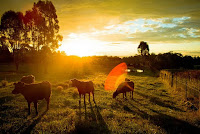
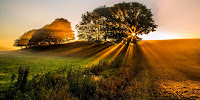
 GOLDEN HOUR: The hour* after sunrise and before sunset.

*Depending on where you are on Earth, the hour will be longer or shorter than an actual 'hour.' 


OUR FORECAST THIS WEEK: Sunrise & sunset times (CLICK HERE).

DIRECTIONS
This week(end), make 18+ images during the golden hours.

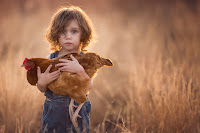
- 9+ photographs = portraits (humans)
- 9+ photographs = subject of your own choosing (animals, flowers...)


RATIONALE 
To observe and record the type of light that occurs during the golden hours. 

EXTRA CREDIT
Two+ morning magic hour photographs (can be the same morning)


EXTRA TIPS, ETC. 


Apps to find the hour(s) in your location:

PROJECT #11: INFRARED (In-class/Photoshop


PROCESS:
1. Duplicate the background layer.
2. On that duplicate background layer, go to IMAGE+ADJUSTMENTS+INVERT. 
3. Change the BLENDING MODE (at the top of the Layers palette) of that new duplicate layer to COLOR.
4. Create a NEW ADJUSTMENT LAYER + CHANNEL MIXER. (Do this by going to the LAYER menu, NEW ADJUSTMENT LAYER)
5. Adjust the CHANNEL MIXER levels to the following:

OUTPUT CHANNEL RED
RED=0
GREEN=0
BLUE=100


OUTPUT CHANNEL GREEN:
RED=0
GREEN=100
BLUE=0

OUTPUT CHANNEL BLUE:
RED=100
GREEN=0
BLUE=0

*These are the basics. Adjust levels as necessary for your individual photographs


6. Add  IMAGE+ADJUSTMENTS+PHOTO FILTER (ETC.) to enhance your photo to your preferences.


The Day Wonderland Stood Still... from Bruce W. Berry Jr on Vimeo.